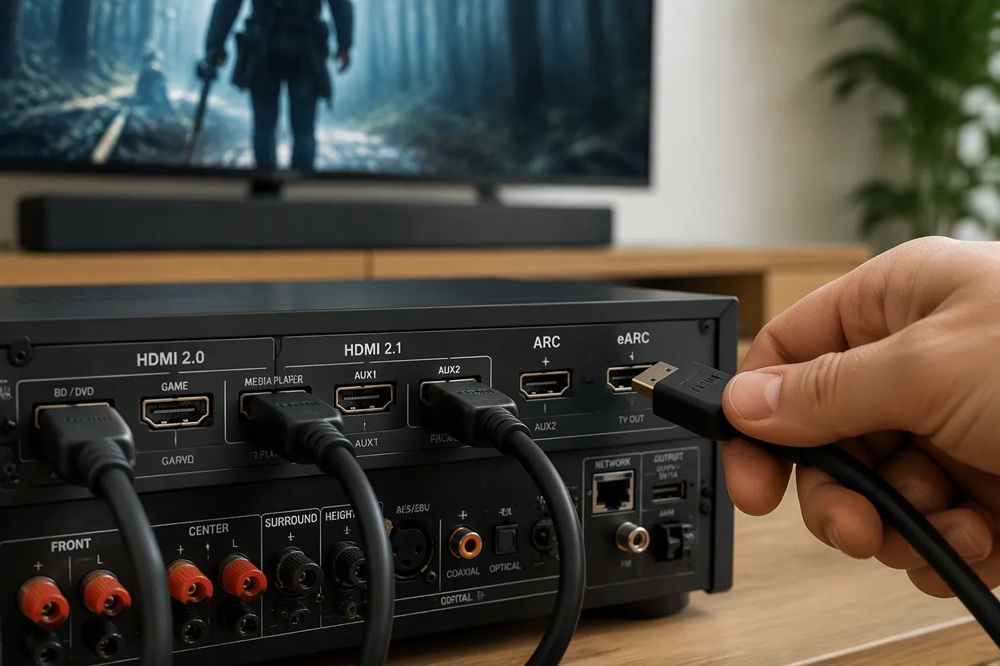
You should prioritize eARC for audio. Add HDMI 2.1 only if you game at 4K/120. For most 4K HDR movie and streaming setups, HDMI 2.0 with eARC is enough. A receiver like the AT-500 8K Dolby Atmos processor covers these needs. Check your TV's ARC/eARC port and your sources first.
The video side of HDMI comes down to one question: how much data can the cable carry, and how fast can your screen refresh? HDMI 2.0 and HDMI 2.1 answer that question very differently. You need to understand these differences before you spend money on a receiver.
HDMI 2.0 has served as the standard for 4K home theater since 2015. It delivers 18 Gbps of bandwidth, which is enough for 4K resolution at 60Hz. That covers virtually every movie, TV show, and streaming service you watch today.
Here is what HDMI 2.0 supports:
Color depth matters here. At 4K and 60Hz, HDMI 2.0 limits you to 4:2:0 chroma subsampling for 10-bit, 12-bit, or 16-bit color. At lower refresh rates like 24Hz or 30Hz, you get full RGB or 4:4:4 sampling. This distinction matters for HDR content, because 10-bit color depth is the minimum for a proper HDR experience.
For most people, HDMI 2.0 handles everything they need. You watch 4K HDR movies at 24 frames per second. You stream shows at 60Hz. Neither task pushes the 18 Gbps limit.
HDMI 2.1 changes the game with 48 Gbps of bandwidth. That is nearly three times the capacity of HDMI 2.0. This extra headroom unlocks higher resolutions and faster refresh rates across the board.
|
Specification |
HDMI 2.0 |
HDMI 2.1 |
|
Max Bandwidth |
18 Gbps |
48 Gbps |
|
Max Resolution |
4K |
10K |
|
Max Refresh Rate |
60Hz (at 4K) |
120Hz (at 4K and 10K), 60Hz (at 8K), up to 144Hz (VRR) |
The practical numbers tell the real story. HDMI 2.1 supports 4K at 120Hz and 8K at 60Hz with full HDR. It also handles 1440p at 240Hz and 1080p at 240Hz or higher with Display Stream Compression (DSC). For 10K resolution, you get 120Hz with DSC.
You need the right cable to use these features. The HDMI 2.1a Specification includes the Ultra High Speed HDMI Cable. This is the only cable that complies with the stringent specifications designed to ensure support for all HDMI 2.1a features, including uncompressed 8K@60 and 4K@120.
Ultra High Speed HDMI Cable - Bandwidth Up To 48Gbps
|
Feature |
HDMI 2.1 |
|
Maximum Cable Bandwidth |
Up to 48 Gbps |
|
Cable Designation |
Ultra High Speed HDMI Cable |
|
Example High Resolution |
8K at 60Hz |
|
Example High Refresh Rate |
4K at 120Hz |
|
Typical Applications |
Gaming and advanced AV |
Do you need HDMI 2.1 for movies? No. Almost no film content exists at 4K/120 or 8K. Do you need it for gaming? That depends on your console or PC. The PlayStation 5 and Xbox Series X both support 4K at 120Hz in select titles. A high-refresh gaming PC can push even further.
Two HDMI 2.1 features exist almost entirely for gamers: Variable Refresh Rate (VRR) and Auto Low Latency Mode (ALLM). Neither one improves movie watching. Both make a massive difference in gameplay.
VRR lets the display follow the GPU's actual frame rate rather than a fixed EDID refresh rate. This reduces or eliminates lag, judder, and frame tearing. When your console drops from 120 frames per second to 90 during a busy scene, VRR adjusts the screen refresh to match. The result is fluid motion without visual seams.
ALLM automatically applies the TV's ideal low-latency game mode. You plug in your console, and the TV switches to Game Mode without any menu changes. This lowers input lag, disables motion-smoothing, and can enable VRR automatically for responsive play.
|
Feature |
How it works |
Gaming performance benefit |
|
VRR |
Uses the display's refresh rate to match the console/GPU's varying frames per second. |
Reduces or eliminates screen tearing, visual seams, judder, and lag for fluid gaming. |
|
ALLM |
Automatically switches the TV into Game Mode when a game console input is detected. |
Lowers input lag, disables motion-smoothing, and can enable VRR automatically for responsive play. |
|
HDMI 2.1 relevance |
VRR and ALLM are standard HDMI 2.1 features; some TVs support variations over HDMI 2.0b. |
Using HDMI 2.1 inputs and cables provides sufficient bandwidth for VRR at higher resolutions and frame rates (e.g. 4K@120Hz). |
For the best gaming experience, prioritize a TV that supports both VRR and ALLM. Most VRR-equipped TVs also include ALLM. If a TV supports ALLM but not VRR, VRR is still the more impactful feature for smooth gameplay. Choosing a model with both is strongly recommended.
A Tonewinner receiver with HDMI 2.1 inputs gives you the full bandwidth these features require. The AT-500 8K Dolby Atmos processor passes 4K/120, VRR, and ALLM signals without compromise. That means your console connects to the receiver, the receiver passes the signal to your TV, and you lose nothing in the chain.
Video gets most of the attention when people talk about HDMI. Audio matters just as much for a home theater. The Audio Return Channel (ARC) and its successor, enhanced ARC (eARC), determine which sound formats your receiver can pull from your TV. The difference between them is dramatic, and it affects everything from streaming shows to 4K Blu-ray discs.
ARC launched with HDMI 1.4 in 2009. It solved a real problem: before ARC, you needed a separate optical cable to send TV audio back to your receiver. ARC let the same HDMI cable carry audio in both directions. Your TV sends sound to the receiver, and the receiver sends video to the TV.
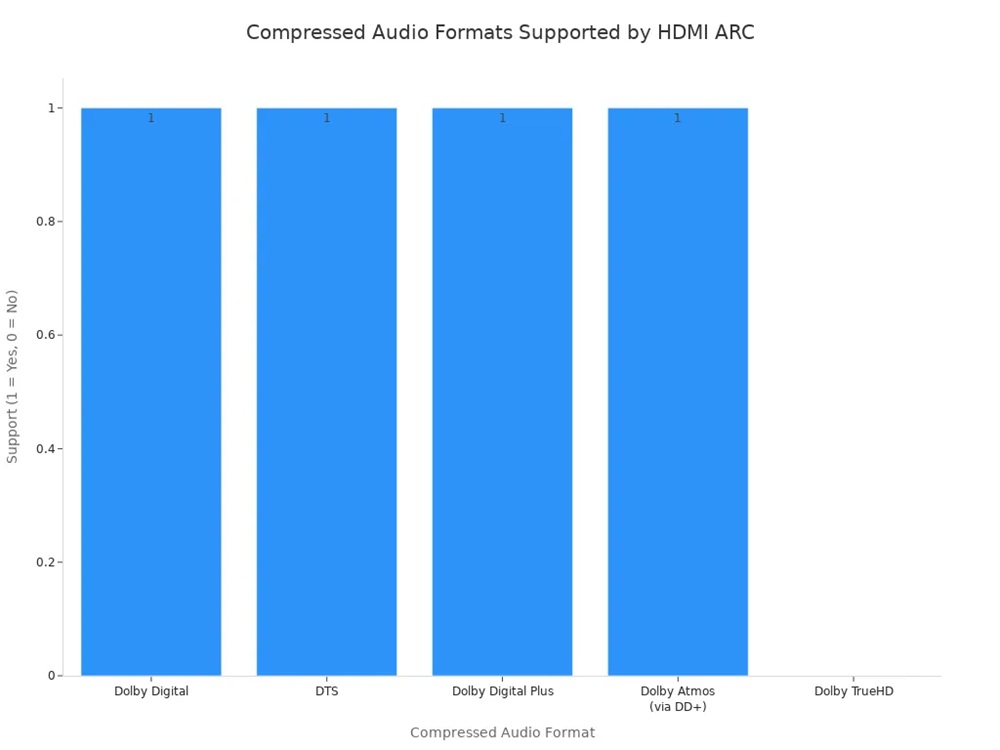
The catch is bandwidth. ARC caps out at roughly 1 Mbps. That limit forces ARC to use compressed, lossy audio formats. You get Dolby Digital and DTS at 5.1 channels. You also get Dolby Digital Plus, which streaming services use to carry a compressed version of Dolby Atmos.
HDMI ARC supports Dolby Atmos, but primarily the compressed Dolby Digital Plus version used by streaming services; for lossless Dolby TrueHD Atmos, you need the higher bandwidth of HDMI eARC.
DD+ is a compressed stream. To use an uncompressed stream you need eARC.
Here is what ARC handles in practice:
|
Compressed Format |
Channels |
Notes |
|
Dolby Digital |
5.1 |
Supported over HDMI ARC |
|
DTS |
5.1 |
Supported over HDMI ARC |
|
Dolby Digital Plus |
5.1 |
Atmos-enabled variant; works over ARC if the TV supports it |
|
Dolby Atmos (via DD+) |
Up to 5.1 |
Compressed Atmos carried over ARC; limited to ~768 Kbps within ARC's 1 Mbps cap |
|
Dolby TrueHD |
Lossless |
Not supported over ARC; requires eARC |
ARC also limits PCM audio to 2.0 stereo. That restriction matters if you want multichannel uncompressed audio from a game console or PC. ARC simply cannot carry it.
eARC arrived with HDMI 2.1 and raised the audio ceiling from about 1 Mbps to roughly 37 Mbps. That is a 37x increase in capacity. The extra bandwidth unlocks lossless audio formats that ARC cannot touch.
|
Feature |
HDMI ARC |
HDMI eARC |
|
Audio Bandwidth |
~1 Mbps |
~37 Mbps |
|
Audio Quality |
Compressed (Lossy) |
Uncompressed (Lossless) |
|
Supported Formats |
Dolby Digital, DTS, Dolby Atmos (via Dolby Digital Plus) |
Dolby TrueHD, DTS-HD Master Audio, uncompressed 5.1/7.1, 32-channel audio, TrueHD Atmos |
|
HDMI Version |
HDMI 1.4 / 2.0 |
HDMI 2.1 |
The format list tells the real story. eARC carries Dolby TrueHD and DTS-HD Master Audio, the lossless codecs found on 4K Blu-ray discs. It supports uncompressed 5.1 and 7.1 PCM. It handles up to 32 channels of audio. It also passes full lossless Dolby Atmos and DTS:X, the object-based formats that place sound in three-dimensional space.
ARC supports compressed audio like Dolby Digital or DTS at around 1 Mbit/s, while eARC delivers up to 37 Mbit/s, supporting uncompressed 5.1/7.1 PCM, Dolby TrueHD, and object-based formats like Dolby Atmos and DTS:X.
|
Audio Format / Feature |
HDMI ARC |
HDMI eARC |
|
Bandwidth |
~1 Mbit/s |
Up to 37 Mbit/s |
|
PCM |
2.0 stereo only |
Up to 7.1 PCM |
|
Dolby Digital / DTS 5.1 |
Supported (compressed) |
Supported (compressed) |
|
Dolby Digital Plus (DD+) |
Limited |
Higher bitrates |
|
Dolby TrueHD / DTS-HD MA |
Not supported |
Lossless support |
|
Dolby Atmos / DTS:X |
Limited (compressed via DD+) |
Full lossless support |
You need an Ultra High Speed HDMI cable to use eARC at full capacity. The cable must support the higher bandwidth, and both your TV and your receiver must have eARC-enabled ports. A Tonewinner receiver with eARC handles these lossless formats without downmixing or compression. The AT-500 8K Dolby Atmos processor passes TrueHD Atmos and DTS:X exactly as the disc or console sends them.
ARC is not obsolete. It handles the audio formats that most people actually use every day. If you stream shows from Netflix, Disney+, or Amazon Prime Video, ARC works fine. Those services deliver audio in Dolby Digital Plus, which fits inside ARC's bandwidth limit.
You should stick with ARC in a few common situations. Your TV only has an ARC port, not an eARC port. Your receiver predates eARC and still works well. You watch mostly streaming content and own no 4K Blu-ray player. In these cases, ARC delivers solid 5.1 surround sound and compressed Atmos without any extra cost.
The moment you add a 4K Blu-ray player or a gaming console that outputs lossless audio, ARC becomes the bottleneck. You lose TrueHD, DTS-HD Master Audio, and uncompressed multichannel PCM. Your receiver either downmixes the audio or plays nothing at all. That is when eARC stops being optional and becomes necessary.
You see this question everywhere. Many buyers assume eARC needs HDMI 2.1. That assumption costs them money. The truth is simpler and more practical.
eARC does not require HDMI 2.1. Manufacturers can implement eARC on HDMI 2.0b chipsets. The audio quality and bandwidth stay identical either way. You get the same Dolby Atmos TrueHD and DTS:X support on both versions.
The key requirement is the HDMI chipset. It must support the necessary bandwidth on pins 14 and 17. These pins originally carried the HDMI Ethernet Channel. Your cable must also be Ethernet-channel compliant with twisted pair wiring. When these conditions are met, eARC operates fully over HDMI 2.0b ports.
This means you can buy an HDMI 2.0 receiver with eARC and get lossless audio. You do not need to pay extra for HDMI 2.1 just to unlock TrueHD Atmos or DTS:X.
HDMI 2.1 adds very little to audio performance. The eARC specification itself does not change between HDMI 2.0b and HDMI 2.1. The audio formats, bandwidth, and channel support remain the same.
|
Audio Feature |
eARC on HDMI 2.0b |
eARC on HDMI 2.1 |
|
Max Audio Bandwidth |
~37 Mbps |
~37 Mbps |
|
Dolby TrueHD Atmos |
Supported |
Supported |
|
DTS:X |
Supported |
Supported |
|
Uncompressed 7.1 PCM |
Supported |
Supported |
HDMI 2.1 benefits video, not audio. You gain 4K/120, VRR, and ALLM for gaming. For sound quality alone, HDMI 2.0 with eARC delivers everything a home theater needs. A Tonewinner receiver with eARC on HDMI 2.0 gives you full lossless audio without the HDMI 2.1 price premium.
Choosing a receiver means choosing which audio formats it can decode. Your receiver must match the formats your sources actually output. Understanding the difference between compressed streaming audio and lossless disc audio helps you pick the right model.
Dolby Atmos and DTS:X are object-based surround formats. They place sounds anywhere in a three-dimensional space, not just at fixed channels. You need overhead speakers for the full effect. A 5.1 system cannot reproduce the height dimension properly. You need at least a 5.1.2 or 7.1.4 speaker configuration.
|
Immersive Format |
Streaming Codec |
Disc Codec |
Connection Note |
|
Dolby Atmos |
Dolby Digital Plus (compressed) |
Dolby TrueHD (lossless) |
eARC passes TrueHD from 4K Blu-ray |
|
DTS:X |
Rare on streaming |
DTS-HD Master Audio (lossless) |
High bitrate; mostly physical media |
Most streaming services deliver Atmos through Dolby Digital Plus. That compressed codec works over ARC or a direct HDMI connection. Disc-based Atmos uses Dolby TrueHD, a lossless codec. That format requires eARC if you route it through your TV.
Dolby TrueHD and DTS-HD Master Audio are the lossless soundtracks on 4K Blu-ray discs. They reproduce audio bit-for-bit, matching the studio master exactly. Compressed formats like Dolby Digital Plus throw away audio data to save bandwidth.
|
Audio Format |
Bitrate Range |
Compression Type |
|
Dolby Digital Plus |
Up to 1.7 Mbps |
Lossy |
|
Dolby TrueHD |
Lossless (bit-perfect) |
Lossless |
|
DTS-HD Master Audio |
Up to 6 Mbps |
Lossless |
Lossless audio reveals details compressed formats mask. Instrumental textures, spatial cues, and dynamic range all improve. On a revealing speaker system, the difference is immediately noticeable. A 4K Blu-ray player connected directly to your receiver passes TrueHD and DTS-HD MA without eARC. The AT-500 8K Dolby Atmos processor decodes both formats fully.
Uncompressed PCM is the raw audio your console outputs. A PlayStation 5 or Xbox Series X can send 5.1 or 7.1 PCM to your TV. Getting that signal from your TV to your receiver is the problem.
ARC carries the same limitations as optical. It passes stereo PCM only. Multichannel PCM, Dolby TrueHD, and DTS-HD Master Audio cannot travel over ARC. You need eARC for those formats.
Your TV's ARC port caps audio at roughly 1 Mbps. That limits you to compressed Dolby Digital and DTS. If you connect a console directly to an HDMI 2.0 receiver with eARC, you bypass the TV entirely. A Tonewinner receiver like the AT-500 8K Dolby Atmos processor handles full multichannel PCM from gaming consoles without any compression.
Your equipment list determines which HDMI features you need. Match your receiver to your actual sources instead of buying for hypothetical upgrades.
You stream everything through a smart TV or streaming stick. Your sources output Dolby Digital Plus audio, including compressed Atmos. ARC handles this audio without any problem. An HDMI 2.0 receiver with ARC covers your needs completely. You gain nothing from HDMI 2.1 or eARC in this setup.
You own a 4K Blu-ray player and want lossless audio. This setup demands eARC. Your player must bitstream the TrueHD codec from the disc, and your receiver must decode it.
|
Requirement |
Detail |
|
Connection type |
HDMI to the receiver; digital audio out cannot carry Atmos |
|
Player output |
Bitstream the underlying TrueHD codec from the disc |
|
Signal format |
Dolby MAT wraps TrueHD audio with Atmos object metadata |
|
Device support |
Both the disc and receiver must support Atmos |
Without Dolby MAT, you only get lossy Dolby Digital Plus Atmos. A Tonewinner receiver with eARC passes full-lossless Atmos from your player.
You game at 4K/120 with VRR enabled. This setup requires HDMI 2.1 on your receiver and TV.
|
HDMI 2.1 Feature |
Gaming Benefit |
|
48Gbps bandwidth |
Carries 4K at 120Hz |
|
VRR |
Syncs refresh rate with game output, reducing tearing |
|
ALLM |
Automatically sets low-latency mode |
|
QFT |
Lowers frame-transfer delay |
Your console's HDMI 2.1 port and cable provide enough bandwidth for these modes. The AT-500 8K Dolby Atmos processor passes 4K/120, VRR, and ALLM without compromise.
You have the right receiver and the right TV. Now you need to connect everything correctly. Compatibility issues cause more home theater problems than missing features. A receiver with every format on the spec sheet still fails if you plug cables into the wrong ports or skip a firmware update. This section walks you through the physical setup and the common pitfalls.
Your TV has multiple HDMI inputs. Only one of them supports eARC. You must find that specific port before you connect anything.
Manufacturers label these ports clearly. Look for the HDMI jack marked eARC on the back or side of your TV. An ARC-compatible soundbar or receiver only works when you connect it to the HDMI jack labeled ARC or eARC. If you see two labels, choose the one marked eARC rather than ARC. The eARC port carries the higher bandwidth your lossless audio formats require.
Some TVs place the eARC port on the side panel for easy access. Others put it on the rear panel alongside three or four other HDMI inputs. Check your TV's manual if the labels are hard to read. The port position matters less than the label. You need the eARC label, not just any HDMI input.
Connect your receiver to the TV's eARC port. A standard HDMI port will not pass lossless audio back to your receiver.
Your receiver has a limited number of HDMI inputs. You need to assign each source device to the right port. The goal is simple: send video to your TV and audio to your speakers without losing quality along the way.
Most AV receivers include only one or two HDMI 2.1 inputs. That limitation shapes how you connect gaming consoles. Here is the recommended approach for a PS5 or Xbox Series X setup:
This setup works well when your TV has multiple HDMI 2.1 inputs. A Tonewinner receiver handles the audio side perfectly in this configuration. The AT-500 8K Dolby Atmos processor decodes every format your console sends through eARC.
Denon/Marantz series only have one HDMI 2.1 input. As you are planning on getting an LG CX that has multiple hdmi 2.1 inputs, I would hook up the Xbox series X and PS5 directly using eARC to route the sound back to the AVR.
For 4K Blu-ray players and streaming devices, connect them directly to the receiver. These sources do not need HDMI 2.1 bandwidth. The receiver passes their video to the TV and processes their audio internally. This approach simplifies your setup and reduces cable clutter.
Cables matter more than most people realize. An old HDMI cable from 2015 will not carry 4K/120 or eARC audio. You need Ultra High Speed HDMI cables for HDMI 2.1 features. These cables support 48 Gbps bandwidth and carry every format your receiver and TV can process.
|
Cable Type |
Bandwidth |
Best For |
|
Standard HDMI |
Up to 10.2 Gbps |
1080p, basic ARC |
|
High Speed HDMI |
Up to 18 Gbps |
4K/60, ARC, HDMI 2.0 features |
|
Ultra High Speed HDMI |
Up to 48 Gbps |
4K/120, 8K, eARC, VRR, ALLM |
The HDMI handshake can cause problems even with the right cables. This handshake is the communication between your TV, receiver, and source devices. When it fails, you see a black screen or hear no audio. Try these steps when the handshake fails:
Firmware updates fix many compatibility issues. Manufacturers release updates that improve HDMI 2.1 support, add VRR compatibility, and resolve eARC handshake problems. Check your TV and receiver manufacturer's website for the latest firmware. Install every update before you troubleshoot further. A Tonewinner receiver ships with current firmware and receives regular updates for new format support.
You walk into a store or open a product page. The spec sheet lists dozens of features. Which ones actually matter for your setup? Focus on the ports and formats you will use today.
Count your source devices first. You need enough HDMI inputs for your console, Blu-ray player, and streaming stick. Look for at least one eARC port for lossless audio. Check for HDMI 2.1 inputs if you game at 4K/120. Verify HDCP 2.3 support for 4K and 8K content. Confirm Dolby Atmos and DTS:X decoding. These features cover modern home theater needs.
The AT-500 8K Dolby Atmos processor delivers professional-grade specifications at a reasonable price. A Cirrus Logic CS42528 DAC drives the audio stage. Signal-to-noise ratio reaches ≥110 dB. Total harmonic distortion stays at ≤0.004%. The unit supports Dolby Atmos, Dolby TrueHD, DTS:X, and DTS-HD Master Audio. HDMI 2.1 with 40 Gbps bandwidth passes 8K video and eARC audio. Channel outputs reach 7.3.6 or 9.3.4 configurations.
|
Specification |
Value |
|
DAC |
Cirrus Logic CS42528 |
|
SNR |
≥110 dB |
|
THD |
≤0.004% |
|
HDMI |
6 inputs, 2 outputs; HDMI 1–3 support 8K |
|
Immersive Audio |
Dolby Atmos, DTS:X, TrueHD, DTS-HD MA |
Customers describe the AT-500 8K Dolby Atmos processor as "an incredible deal" with accurate, warm sound and smooth input switching.
Tonewinner builds the AT-500 8K Dolby Atmos processor for buyers who want flagship features without flagship pricing. The processor includes ETQ automatic sound-field calibration, RS232 control, and CEC integration. You get 16-channel Dolby Atmos decoding and dual DTS:X support. The AT-500 8K Dolby Atmos processor covers your audio and video needs without overspending on unused specs.
Buy for your current setup. Choose eARC if your TV supports it. HDMI 2.1 is worth it only when your TV and games can actually run 4K/120 or 8K. ARC handles basic TV audio, but eARC is the safer pick for lossless audio and future-proofing. Verify the whole chain: TV, receiver, sources, and cables all need compatible HDMI ports. A receiver like the AT-500 8K Dolby Atmos processor from Tonewinner covers modern audio and video needs without overspending on unused specs.
No. You get eARC on HDMI 2.0b receivers. The audio bandwidth stays identical at roughly 37 Mbps. A Tonewinner receiver with eARC delivers lossless audio without HDMI 2.1.
No. Almost no film content runs at 4K/120 or 8K. HDMI 2.0 handles every movie and streaming service at full quality. You gain nothing from HDMI 2.1 for movie watching.
Yes, but only the compressed Dolby Digital Plus version. Streaming services use this format. Lossless Dolby TrueHD Atmos requires eARC. Check your TV and receiver ports before you buy.
Tel : +86 020 3479 6146
Tel : +86 020 3479 7660
WhatsApp : +86 15812388120
Email : simi@tonewinner.com
Address : Building 2, No.1, Hongsheng 3 Road Dashi Street, Panyu District Guangzhou, 511430 China
© 2026 Guangzhou Tonewinner Electronics Co., Ltd
Sitemap | XML | Privacy Policy |