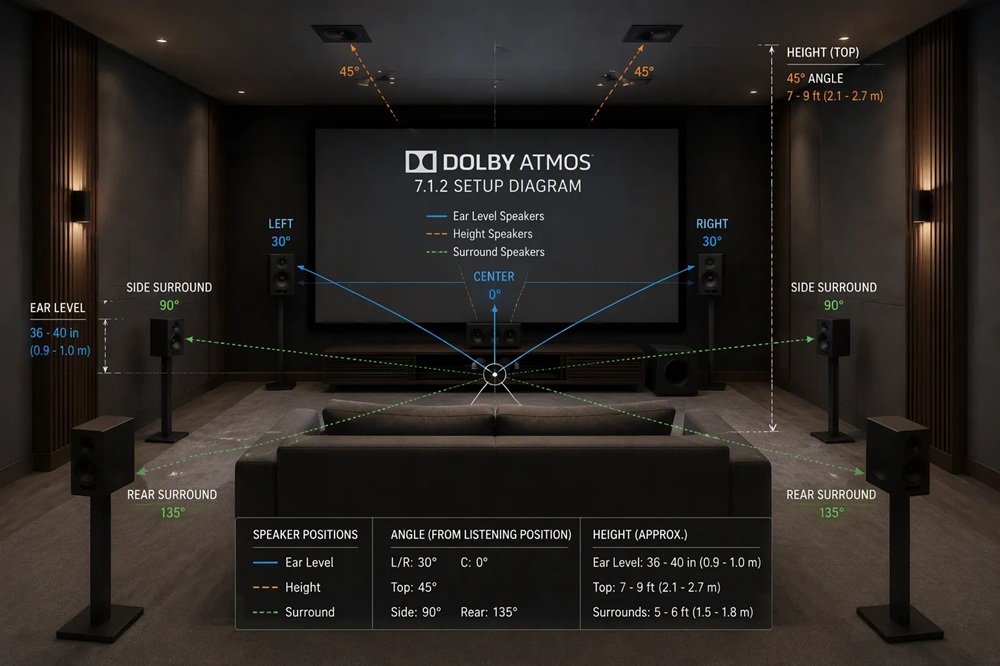
You need exact numbers to place Dolby Atmos speakers well. In a 5.1.2 setup, mount two overheads at 45° elevation, or 65° from horizontal. A 7.1.4 layout uses four tops at 45° in front of and 135° behind the main listening position. The 9.3.4 system adds front-wide and rear overhead positions.
Height matters just as much. Mount overhead speakers 30–55 inches above ear level and aim each one at the main listening position. Dolby's guidance sets the acoustic center of each top speaker at least 2.4 m high, roughly 1.2 m above the 1.2 m ear level, with no stated maximum. The bed layer follows one baseline: all ear-level tweeters sit at seated ear height, about 36–42 inches. A Tonewinner TD-8 7.1 home theatre speaker system gives you a solid foundation for these angles.
Keep every overhead aimed at the main listening position, not straight down.
Each Dolby Atmos label contains three numbers, and each position tells you something specific about the layout. Read the notation left to right and you can decode any configuration in seconds.
|
Position in notation (e.g., 5.1.2) |
Meaning |
Example in 5.1.2 |
|
First number |
Main horizontal (bed) channels |
5 bed speakers |
|
Second number (after first dot) |
Dedicated low-frequency effects (LFE) channel for subwoofer |
1 LFE channel |
|
Third number (after second dot) |
Overhead / height channels |
2 height channels |
You can apply this scheme to every layout. A 5.1.2 system gives you five bed channels, one LFE channel, and two overhead channels. A 7.1.4 system scales up to seven bed channels, one LFE channel, and four height channels. The 9.3.4 layout adds two more bed channels and two more subwoofers.
The bed layer and the overhead channels do different jobs, and you should treat them as separate systems during installation. Bed channels reproduce sounds anchored to your room's walls and floor. Their imaging depends heavily on speaker placement, so angular spacing between speaker pairs matters. Overhead channels render elevated objects and overhead pans. A physical top-middle speaker delivers more discrete overhead imaging than phantom imaging between distant front and rear heights.
One caution applies to wide channels. As Dolby guidance notes:
"Atmos only uses wides for moving objects so any bed sounds (most movies have loads of them) will be weak sounding in layouts depending on wides to bridge a strong image between the mains and sides. Top Middle generally doesn't have this issue."
Every angle in this guide radiates from one point: the main listening position (MLP). Pick the seat where you watch most content. Measure from that seat's ear height, not from the floor. Mark the MLP on a simple floor plan. All horizontal angles and distances reference this single point. A centered MLP gives you symmetric speaker spacing and balanced imaging across the front stage.
Set every bed-layer tweeter at seated ear height, roughly 36–42 inches from the floor. This baseline keeps the horizontal plane of sound aligned with your ears. Measure your own seated ear height with a tape measure. Use that number for the left, center, right, and surround speakers. Consistent tweeter height across the bed layer preserves smooth panning between channels.
Dolby specifies overhead speakers at 45° elevation, which equals 65° from horizontal. Measure this angle from the MLP to the acoustic center of each top speaker. Aim each overhead driver at the MLP rather than straight down. The table below summarizes the core placement values.
|
Parameter |
Recommended value |
|
Overhead elevation angle |
45° (65° from horizontal) |
|
Overhead height above ear level |
30–55 inches |
|
Bed-layer tweeter height |
36–42 inches (seated ear height) |
|
Overhead aim point |
Main listening position |
Measure every overhead angle from the main listening position, and confirm each one with a protractor or angle app before you finalize mounting.
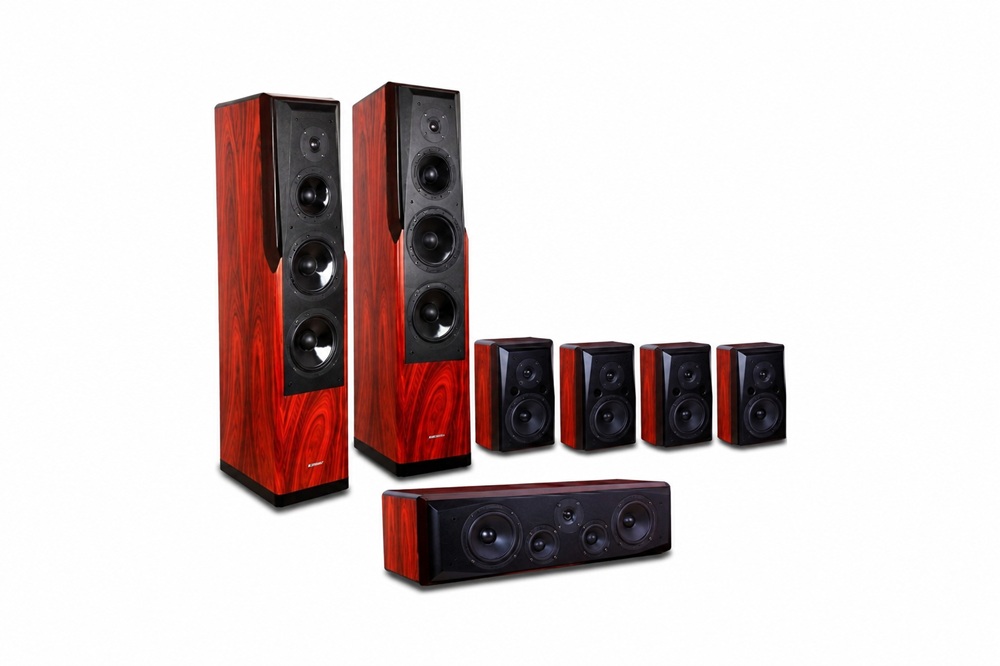
A Tonewinner TD-8 7.1 home theatre speaker system pairs well with these principles, and its calibration-friendly design helps you lock in accurate angles and levels.
A 5.1.2 layout gives you the simplest path into Dolby Atmos. You place five bed speakers at ear height and two overhead speakers above the listening area. Every angle below references the main listening position (MLP). Measure each value from that seat, and record your numbers before you drill a single hole.
The front three speakers form the anchor of your entire system. Dolby specifies a 22–30° angle for the left and right mains, measured from the MLP to each speaker's acoustic center. Aim for the middle of that window, roughly 26°, when your room allows it. The center channel sits at 0°, directly in front of the MLP.
Set all three tweeters at seated ear height, about 36–42 inches from the floor. Keep the three tweeters on one horizontal line. A center channel mounted higher or lower than the mains smears dialogue pans across the front stage.
Toe-in matters here. Angle each main speaker inward so its tweeter axis points at the MLP. This alignment sharpens the front image and keeps the left-center-right transition smooth. A Tonewinner TD-8 7.1 home theatre speaker system gives you matched front-stage voicing, so the three speakers blend cleanly once you set the angles correctly.
Distance from the MLP to each front speaker should be equal. Use a tape measure, not your eyes. Symmetry across the center line preserves stable imaging for every listener in the room.
The surround speakers sit beside and slightly behind the MLP. Dolby places them at 90–110° from the front center line, measured horizontally. A 90° position puts each surround directly to your side. A 110° position pulls them behind your ears. Both work, and the choice depends on your room shape and seat location.
Mount the surrounds at the same ear height as the front three, 36–42 inches. Consistent tweeter height across all five bed speakers keeps panning natural as sounds travel from front to back. Aim each surround tweeter toward the MLP, not at the opposite wall.
Keep the surrounds clear of nearby walls and furniture. A speaker pressed against a side wall produces early reflections that blur the surround field. Give each cabinet a few inches of breathing room when your layout permits.
The table below collects the 5.1.2 bed-layer targets for quick reference.
|
Speaker |
Horizontal angle from MLP |
Tweeter height |
|
Left / Right main |
22–30° |
36–42 in (ear level) |
|
Center |
0° |
36–42 in (ear level) |
|
Left / Right surround |
90–110° |
36–42 in (ear level) |
The two overhead speakers complete the 5.1.2 layout. Dolby specifies a 45° elevation angle for each top speaker, which equals 65° from horizontal. Measure this angle from the MLP up to the acoustic center of each speaker.
Place the two tops in line with the left and right mains. Their horizontal position mirrors the front stage, so overhead effects pan in step with the bed layer below. Mount them 30–55 inches above ear level, and aim each driver at the MLP rather than straight down.
Follow this sequence to lock in both overhead positions:
Dolby's guidance sets the acoustic center of each top speaker at least 2.4 m high, roughly 1.2 m above a 1.2 m ear level, with no stated maximum.
A ceiling height of 8 feet or more makes the 45° geometry easy to hit. Lower ceilings compress the available height window, so verify the angle first and adjust the horizontal distance if needed. Move the tops slightly forward or back along the ceiling to preserve 45° elevation at your chosen mounting height.
The Tonewinner TD-8 7.1 home theatre speaker system supports this two-overhead configuration well. Its calibration-friendly design lets you dial in distances and levels for the top pair, so the overhead layer integrates with the bed layer instead of floating above it.
A 7.1.4 layout doubles your overhead coverage and adds two side surrounds to the bed layer. You now place seven ear-level speakers and four ceiling speakers. Every angle still radiates from the main listening position (MLP), so mark that seat first and measure from your seated ear height.
The front stage in a 7.1.4 system matches the 5.1.2 layout. Place the left and right mains at 22–30° from the MLP, with the center channel at 0°. Set all three tweeters at seated ear height, about 36–42 inches. Toe each main inward so its tweeter axis points at the MLP.
The side surrounds sit at 90–110° from the front center line, directly beside or slightly behind your seat. Mount them at the same ear height as the front three. Aim each tweeter at the MLP and keep the cabinets a few inches off the side walls.
The two rear surrounds complete the seven-channel bed. Dolby places them at 135–150° from the front center line, behind the MLP. Angle them inward toward the listening seat. Keep their tweeters on the same 36–42 inch line as the rest of the bed layer. Consistent height across all seven speakers keeps pans smooth as sounds travel from the screen to the back wall.
Symmetry matters more in a 7.1.4 room than in a 5.1.2 room. Measure the distance from the MLP to each surround pair and match the left and right values. A mismatch of a few inches pulls the surround image to one side.
Four overhead speakers give you discrete front and rear height channels. Dolby's 7.1.4 overhead setup guide confirms four height channels: left and right top front overhead speakers plus left and right top rear overhead speakers. The guide also advises angling each speaker toward a central seating point.
Place the top front pair at 45° elevation in front of the MLP, which equals 65° from horizontal. Place the top rear pair at 135° behind the MLP. The 135° figure measures the horizontal angle around the MLP, so the rear tops mirror the front pair across your seat. Mount all four tops 30–55 inches above ear level and aim each driver at the MLP.
Dolby's official elevation angles for the four height channels place both the top front and top rear speakers within a 65° to 100° range, measured from the seated listener's ear level. At 65° the speaker remains clearly forward or rearward of center. At 100° it passes vertical, which you can only achieve with angled baffles or on-wall mounts. These wider angles create the sense of overhead sound extending forward and backward rather than sitting directly above your head.
|
Speaker Position |
Recommended Elevation Angle (above ear level) |
|
Top Front (7.1.4) |
65° – 100° |
|
Top Rear (7.1.4) |
65° – 100° |
Use this table as your working window. Start at 65° for both pairs and adjust toward 100° only when your ceiling height and mounts allow it. A standard 8-foot ceiling usually lands the tops near the lower end of the range. Higher ceilings open more of the window.
Follow this sequence to set all four overheads:
The top front pair should line up above the left and right mains. The top rear pair should sit above and slightly outside the rear surrounds. This alignment lets overhead objects pan in step with the bed layer below.
A TD-8 7.1 home theatre speaker system fits this four-overhead layout well. Its calibration-friendly design lets you set separate distances and levels for the top front and top rear pairs, so the height layer blends with the bed layer instead of sounding detached.
Verify the 45° front and 135° rear positions with a protractor or angle app before you finalize any ceiling mount.
A 9.3.4 layout expands the bed layer to nine channels and adds a third subwoofer. You keep the four overhead speakers from the 7.1.4 layout. Measure every angle from the main listening position (MLP) at seated ear height.
The front-wide speakers fill the gap between your mains and side surrounds. Dolby places them at roughly 60° from the front center line. Set their tweeters at seated ear height, about 36–42 inches, and aim each one at the MLP.
The rear surrounds sit at 135–150° behind the MLP, matching the 7.1.4 positions. Keep all nine bed tweeters on one horizontal line. Symmetry across the center line preserves stable imaging for every seat.
|
Speaker |
Horizontal angle from MLP |
|
Left / Right wide |
~60° |
|
Left / Right rear surround |
135–150° |
The overhead layer repeats the 7.1.4 geometry. Mount the top front pair at 45° elevation in front of the MLP, which equals 65° from horizontal. Place the top rear pair at 135° behind the MLP. Set all four tops 30–55 inches above ear level and aim each driver at the MLP.
Three subwoofers smooth out room modes across more seats. Place one sub near each front corner and the third along the rear wall or side wall. Run your receiver's calibration routine, then adjust each sub's level and delay by ear. A Tonewinner TD-8 7.1 home theatre speaker system gives you a calibration-friendly foundation for this multi-sub layout.
Angles and heights set the geometry. Calibration makes every speaker work as one system. The TD-8 7.1 home theatre speaker system responds well to careful setup, and a few measured steps will lock in accurate timing and balanced levels.
Distance settings tell your receiver how long each speaker's sound takes to reach your ears. Follow this sequence:
One user time-aligned all speakers to the center channel, then adjusted distances with a timing chirp until results landed within about an inch. A laser measure at ear height confirmed the receiver's numbers.
Calibrate each speaker to roughly 75 dB with an SPL meter, and set the subwoofer near 77 dB. Verify your receiver's auto-setup results manually, because directional microphones can misread the room. Feed known test tones from a disc into the receiver and calibrate at the 0 dB volume setting. A measurement mic such as a UMIK-1 delivers the most consistent results.
Check every overhead angle one final time. A protractor or phone angle app confirms the 45° elevation and the 135° rear positions. Small errors here blur the height layer, so verify before you finish.
Mount your overheads at 45° elevation (65° from horizontal), 30–55 inches above ear level. Keep bed-layer tweeters at seated ear height. A 5.1.2 layout uses two tops at 45°. The 7.1.4 layout uses four tops at 45° front and 135° rear. The 9.3.4 layout adds wide surrounds and a third subwoofer. The Tonewinner TD-8 7.1 home theatre speaker system and its calibration-friendly design make precise angle-matching easier. Verify your placement with a setup guide or a professional installer.
Mount overhead speakers at 45° elevation, which equals 65° from horizontal. Measure this angle from the main listening position to each top speaker's acoustic center.
Place overhead speakers 30–55 inches above seated ear level. Aim each driver at the main listening position. Dolby sets the minimum acoustic center at 2.4 m with no stated maximum.
No. Angle each overhead driver toward the main listening position. Direct aiming sharpens height imaging and keeps overhead pans locked to the bed layer below.
Tel : +86 020 3479 6146
Tel : +86 020 3479 7660
WhatsApp : +86 15812388120
Email : simi@tonewinner.com
Address : Building 2, No.1, Hongsheng 3 Road Dashi Street, Panyu District Guangzhou, 511430 China
© 2026 Guangzhou Tonewinner Electronics Co., Ltd
Sitemap | XML | Privacy Policy |